

Best AI Assistant for Zoho Mail in 2026: What Actually Helps Beyond Compose
A practical guide to choosing an AI assistant for Zoho Mail based on triage, categorization, summaries, and follow-up workflows rather than writing features alone.
Best AI Assistant for Zoho Mail in 2026: What Actually Helps Beyond Compose
A practical guide to choosing an AI assistant for Zoho Mail based on triage, categorization, summaries, and follow-up workflows rather than writing features alone.
If you use Zoho Mail all day, the real problem usually is not writing emails.
It is deciding what deserves attention first.
A founder's inbox might hold customer questions, sales replies, hiring threads, invoices, internal updates, and a pile of newsletters in the same feed. A creator's inbox might mix sponsorships, PR, affiliate offers, fan replies, and receipts. And once that happens, "AI for email" stops being a writing feature problem and becomes an inbox workflow problem.
That is why choosing the best AI assistant for Zoho Mail in 2026 comes down to one question:
Does it just help you compose faster, or does it actually help you manage the inbox better?
What most Zoho Mail AI tools do well
Zoho already has its own AI layer, Zia, and it covers some useful basics. If your main pain is drafting or summarizing, that may be enough.
In general, built-in Zoho Mail AI tools are good at:
- helping you write faster
- adjusting tone
- summarizing long emails
- reducing blank-page friction
That matters. But for people with overloaded inboxes, it usually solves only one part of the problem.
The bigger issue is not, "How do I write this reply?"
It is, "Why did I only see this important email three hours late?"
Where built-in AI starts to fall short
If your inbox is calm, built-in drafting can be plenty.
If your inbox is crowded, the workflow starts to break:
- high-value threads still compete with newsletters and noise
- new leads and important replies can get buried in a chronological feed
- you still spend time re-reading old threads to remember context
- follow-ups still depend on memory unless you build a separate system
That is the gap many Zoho Mail users run into. They do not need more help writing sentences. They need better triage.
This is where a dedicated AI inbox layer becomes more useful than a compose assistant alone.
What to look for in the best AI assistant for Zoho Mail
If you are comparing tools, these are the features that actually matter.
1. AI categorization, not just AI writing
A good assistant should help sort email by meaning and intent, not just generate copy.
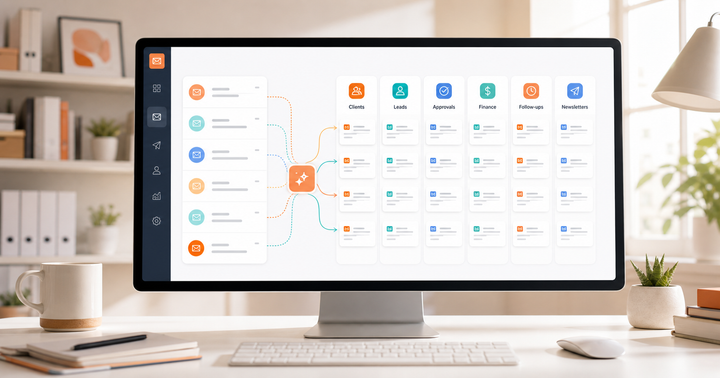
For example, a client issue, a partnership request, an invoice, and a newsletter should not all arrive with the same visual priority. That is where AI categorization becomes more valuable than another compose box.
2. Focused inbox views
The fastest inboxes are not just cleaner. They are separated into useful lanes.
If you can split work into clients, leads, finance, operations, newsletters, or creator deals, you spend less time deciding where to look first. That is the logic behind AI split inboxes.
3. Thread summaries before drafting
A lot of email delay comes from re-orienting, not replying.
If a tool can give you a clear summary of what happened, what is unresolved, and what likely needs to happen next, you get back into long threads much faster. That is especially useful for missed follow-ups, customer threads, and deal conversations. Replyless covers that with thread summaries.
4. Drafts that use context
AI drafts are only useful if they are grounded in the actual thread.
Generic "sounds professional" drafts are rarely the bottleneck. The better workflow is a draft generated from the full conversation, which you then review and edit. That is the point of AI email drafts: faster replies without giving up judgment.
5. A follow-up system
A lot of inbox stress is really open-loop stress.
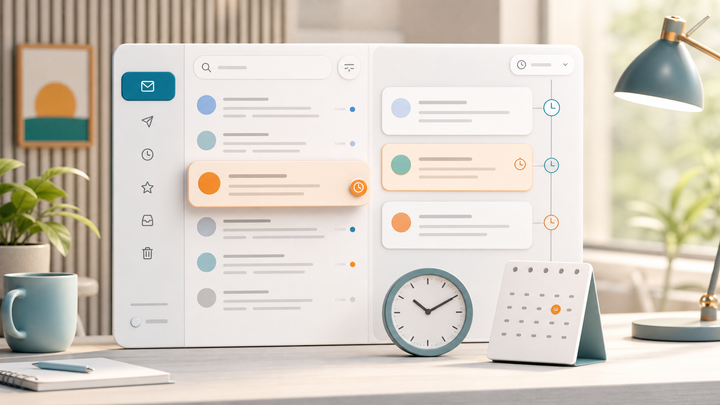
You replied to the message, but now you need to remember to check back in three days. That is why the best assistants do more than compose. They help you keep follow-ups moving. If that is your bottleneck, this guide on how to automate follow-up emails with AI is closer to the real problem than another feature checklist.
So what is the best AI assistant for Zoho Mail?
It depends on what problem you are actually trying to solve.
If you mostly want help writing, Zoho's built-in AI may be enough.
If you want help managing an overloaded inbox, you probably need something more workflow-oriented.
Replyless is a strong fit for Zoho Mail users who want:
- smarter sorting across high-value and low-value email
- focused inbox views instead of one crowded feed
- faster drafting from real thread context
- summaries that reduce re-reading
- better follow-up discipline without keeping everything in the inbox forever
That is especially relevant for founders, creators, freelancers, and lean teams who do not have separate support or operations layers absorbing the inbox for them.
In other words: if your issue is email volume, not just email wording, the best AI assistant for Zoho Mail is likely the one that helps you triage first and draft second.
A simple way to decide
If you are evaluating tools this week, use this test:
- If your main frustration is "writing takes too long," start with compose-focused AI.
- If your main frustration is "important emails keep getting buried," look at inbox-triage tools first.
- If your main frustration is "I lose track of threads after replying," prioritize summaries and follow-up workflows.
That last category is where Replyless is most differentiated.
It is not trying to turn Zoho Mail into a prettier compose window. It is trying to make the inbox easier to run.
The bottom line
The best AI assistant for Zoho Mail in 2026 is not the one with the flashiest writing demo.
It is the one that helps you protect the conversations that matter.
For some people, Zoho's built-in AI will cover enough. But if your inbox is full of clients, leads, operations, creator deals, or support threads, the bigger win is usually triage, categorization, summaries, and follow-up structure.
That is where Replyless has a stronger story.
If you are trying to get to a calmer inbox instead of just a faster draft, start by looking at AI split inboxes, AI categorization, and this founder-focused guide to reaching inbox zero.

Comments ()